



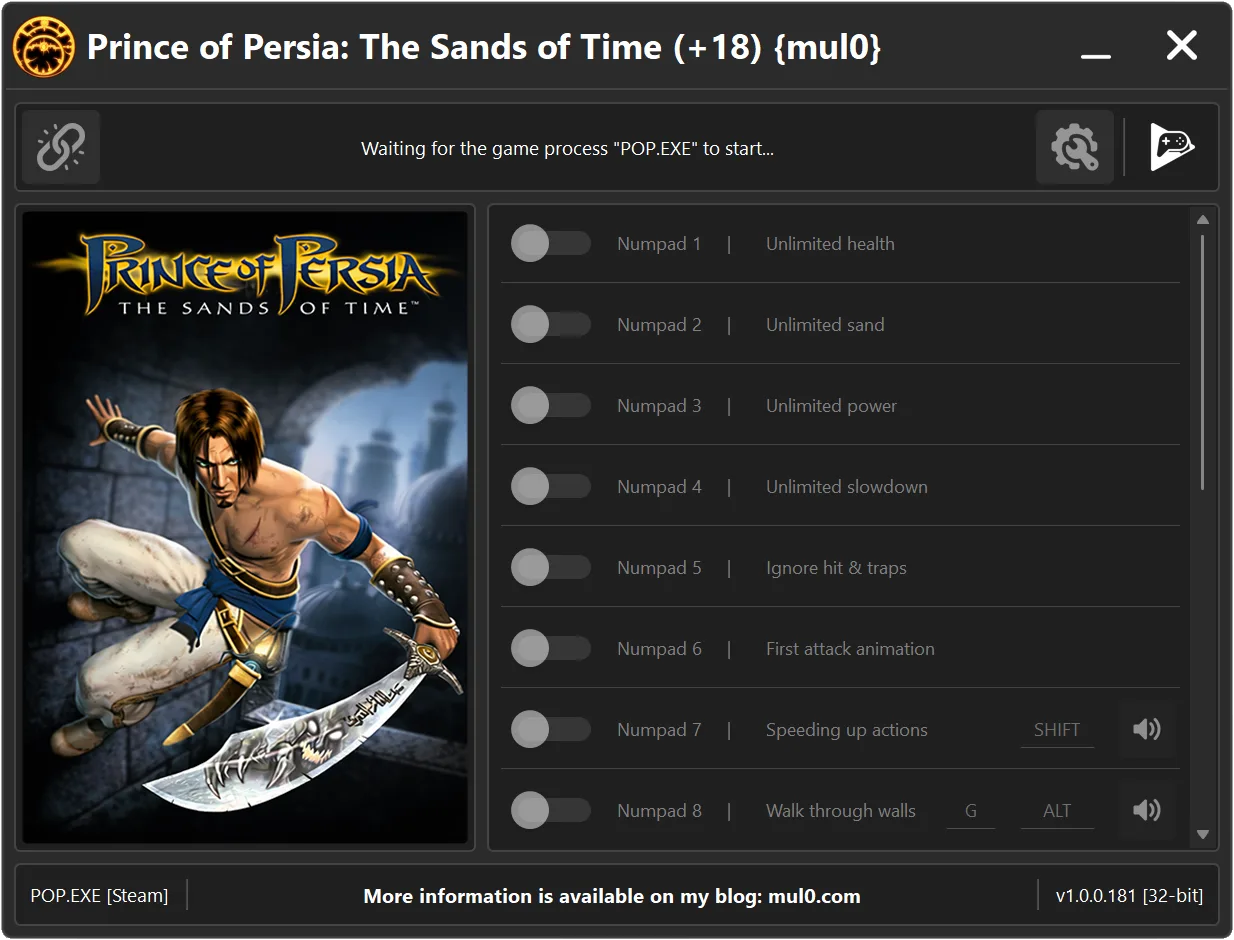
18 Options | Game Version: v1.0.0.181 | Last Updated: 12.04.2026
Game: Prince of Persia: The Sands of Time
Version: v1.0.0.181
Process: POP.EXE (32-bit)
License Type: Steam
Date of Creation: 05.04.2026
Hotkey - Feature [Description]
Numpad 1 - Unlimited health [Your health will never drop to a fatal level, making it effectively unlimited.]
Numpad 2 - Unlimited sand [Provides an unlimited amount of sand of time, allowing continuous use of time powers without consuming sand.]
Numpad 3 - Unlimited power [Special powers can be used without any restrictions.]
Numpad 4 - Unlimited slowdown [Allows the player to remain in slowdown mode indefinitely.]
Numpad 5 - Ignore hit & traps [Allows to ignore damage from enemy attacks and traps.]
Numpad 6 - First attack animation [Forces the game to play only the first attack animation, allowing faster attack.]
Numpad 7 - Speeding up actions [Holding "SHIFT" while performing actions (such as wall running or jumping) speeds them up.]
Numpad 8 - Walk through walls [Allows the player to pass through walls and doors. Hold "ALT" while moving to activate the effect.
Hold "G" to disable all collision and fall through the ground.]
Numpad 9 - Fall protection [Prevents damage or death from falling from great heights.]
F1 - One Hit-Kills [Greatly increases damage, allowing enemies to be defeated in one hits.]
F2 - Instant death [Instantly kills your character.
Press "K" to immediately trigger death and display the death screen.]
F3 - Speed up animations [Increases the speed of all player actions including running, attacks and other movements.
Hold "CTRL" to activate.]
F4 - Unlock last sword [Unlocks the final sword, making it available regardless of story progression.
Note: This option must be enabled in the menu before loading a save game.]
F5 - Fara ignore hits [Fara will not take any damage from enemy attacks, making her effectively invulnerable.]
F6 - Fara fall protect [Prevents Fara from taking damage or dying from high falls, but does not protect against falling out of the map.]
F7 - Invisible [Enemies will not detect or react to you, making you effectively invisible.]
F8 - Quick rewind [Speeds up time rewind, allowing you to rewind time much faster than normal.]
F9 - Viewing angle [Adjusts the camera viewing angle, allowing a wider field of view.]
Instructions:
- Copy all files from the archive to the desktop.
- Start the game and wait until it is fully loaded into gameplay (not just the main menu).
- Only after the game has finished loading, run the trainer.
- If the game process is found successfully, the connect button will become available in the trainer.
How to activate the trainer:
- To activate the trainer, click the button with the broken chain icon. It is located in the upper-left panel of the trainer interface.
- After a successful connection, you can activate and use all available features.
- During the game, press the hotkeys shown in the trainer to enable or disable features.
- Possible false alarm of your antivirus on the trainer.
- If your antivirus blocks the trainer, temporarily disable it.
