


 Toggle Line Comment – Plugin for Cheat Engine
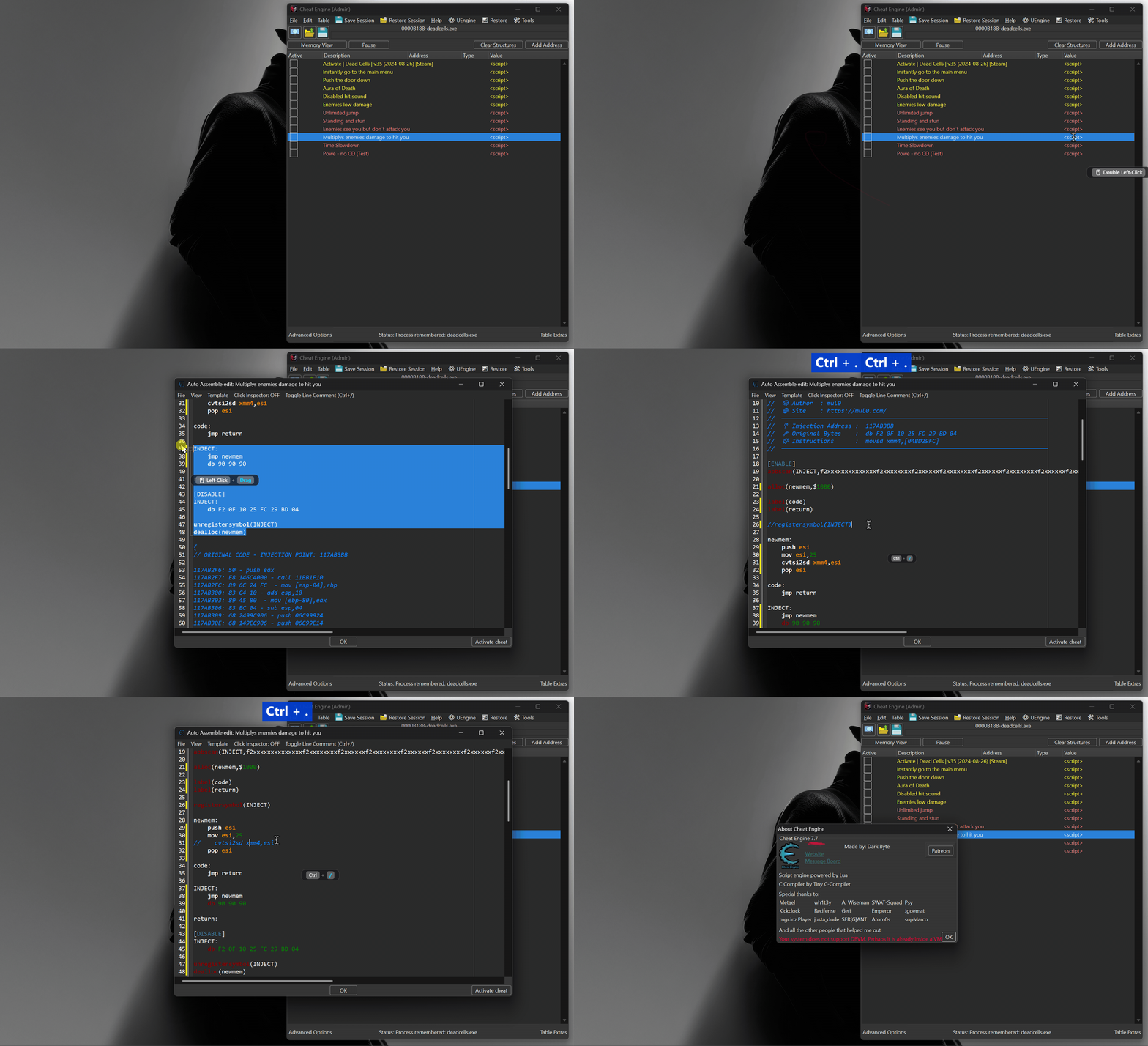
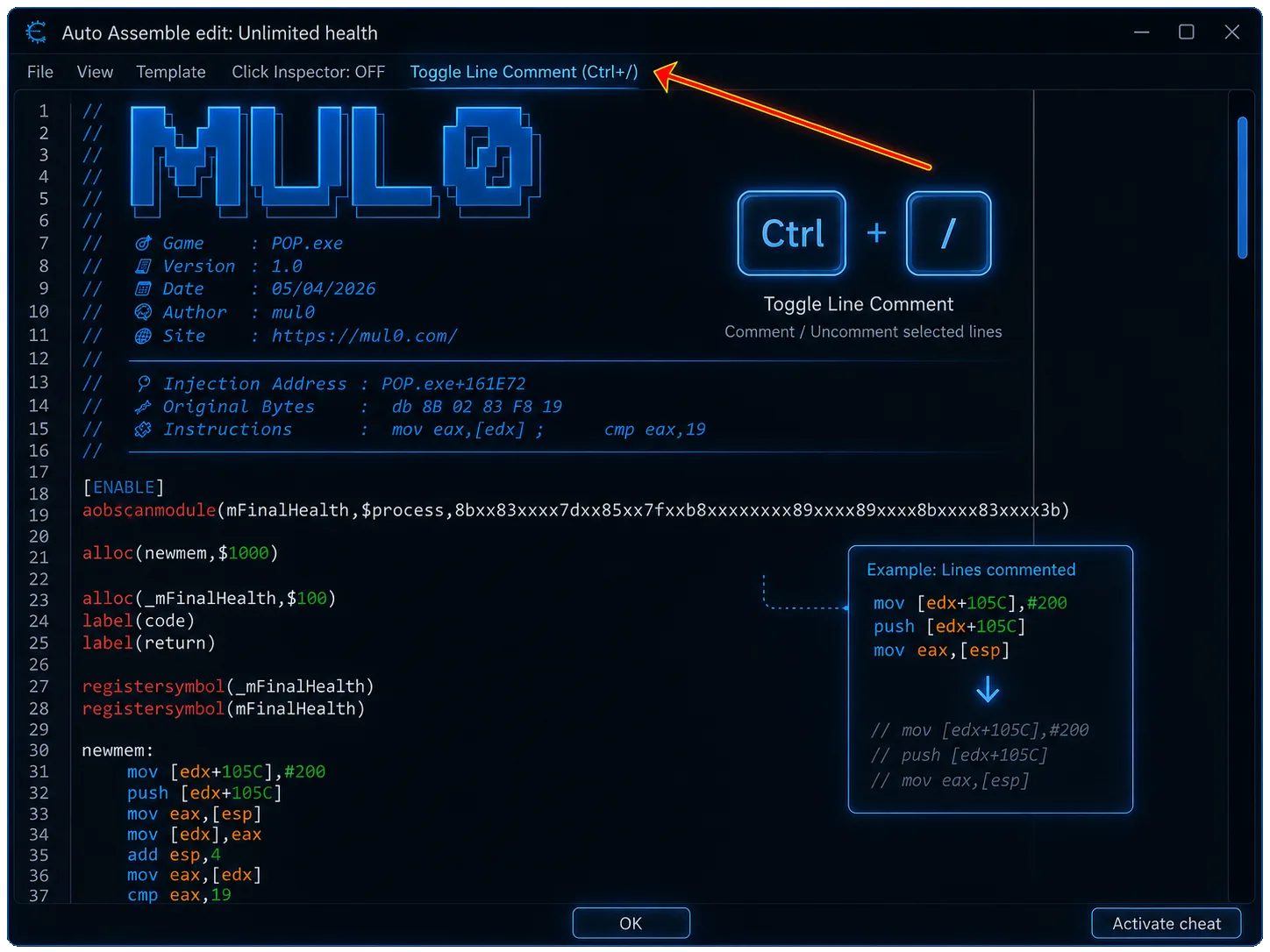
Toggle Line Comment is a lightweight Cheat Engine plugin designed to quickly add or remove // line comments inside the Auto Assembler editor.
The plugin adds the familiar Ctrl + / shortcut for commenting the current line or an entire selected line range. It helps you temporarily disable instructions, organize Auto Assembler scripts, test alternative code blocks, and edit scripts more efficiently without manually inserting or deleting comment markers. 
Toggle Line Comment is a Cheat Engine Lua plugin that integrates directly with Auto Assembler windows. It preserves the editor selection and visible scroll position while modifying lines, providing a smooth workflow even when working with long scripts.
Toggle Line Comment is a Cheat Engine plugin for adding and removing line comments in the Auto Assembler editor using the Ctrl + / shortcut. It is a Cheat Engine Auto Assembler Lua plugin with a Toggle Line Comment command and Ctrl + / keyboard shortcut.
 Plugin Information
- Version: 1.0
- Release Date: June 23, 2026
- Website: https://mul0.com/cheat-engine/plugins/c ... nt-plugin/
- Platform: Cheat Engine (Lua plugin)
- Editor: Auto Assembler
- Hotkey: Ctrl + /
 Key Features
- Adds the familiar Ctrl + / line-comment shortcut to the Cheat Engine Auto Assembler editor.
- Comments or uncomments the current line when no text is selected.
- Supports complete selected line ranges.
- Adds // at the beginning of every target line.
- Removes one leading // when every non-empty target line is already commented.
- Preserves the current text selection after changing the lines.
- Preserves the vertical and horizontal editor scroll position.
- Uses direct text-range edits to reduce viewport movement and scrollbar jumps.
- Adds a Toggle Line Comment (Ctrl+/) command to the Auto Assembler menu.
- Automatically integrates with existing and newly opened Auto Assembler windows.
Line Comment Toggling
Toggle Line Comment provides a simple two-state workflow for Auto Assembler code. Pressing Ctrl + / either comments all target lines or removes their existing comment markers.
- If at least one non-empty target line does not begin with //, the plugin adds // to every target line.
- If every non-empty target line already begins with //, the plugin removes one leading // from each commented line.
- Empty lines do not prevent a selected block from being recognized as commented.
- The comment marker is inserted at the beginning of the line, before existing indentation.
 Current Line & Selection Support
The plugin automatically determines which lines should be modified based on the current caret and selection state inside the Auto Assembler editor.
- With no selection, only the line containing the text caret is toggled.
- With a selection, every line touched by the selection is toggled.
- If a selection ends exactly at the beginning of the following line, that extra line is not modified.
- Forward and reversed selection ranges are handled safely.
- The selection offsets are adjusted after comment characters are inserted or removed.
🖥 Smooth Editor Workflow
Commenting code in a long script should not move you away from the section you are editing. The plugin saves the Auto Assembler editor state before changing the text and restores it immediately afterward.
- Preserves the editor’s visible top line.
- Preserves the horizontal scroll position.
- Restores the original selection after updating line lengths.
- Uses a delayed secondary scroll restoration to handle editor repainting.
- Performs direct range edits from the bottom line upward whenever supported.
- Includes a full-text replacement fallback when direct editing is unavailable.
 Shortcut & Menu Integration
- Open an Auto Assembler script window in Cheat Engine.
- Place the caret on a line or select multiple lines.
- Press Ctrl + / to toggle their line comments.
- You can also use the Toggle Line Comment (Ctrl+/) command from the Auto Assembler menu.
- The plugin recognizes both the standard slash key and the numeric keypad divide key where supported.
- Existing editor keyboard handling remains available for all other keys.
 How It Works (Technical Overview)
 - The plugin detects existing and newly created TfrmAutoInject Auto Assembler forms.
- It connects a keyboard handler to the form’s Assemblescreen editor.
- When Ctrl + / is pressed, it reads the editor text and current selection offsets.
- It identifies the first and last target lines, including selections that span different newline formats.
- It decides whether the target range should be commented or uncommented.
- It inserts or removes // markers using direct editor range edits.
- It recalculates the selection offsets and restores the editor viewport.
- A menu command provides the same action without using the keyboard shortcut.
- This approach makes script editing faster while minimizing unwanted cursor movement, selection changes, and scrollbar jumps.


 Installation
- Place the “MiAuto Assembler – Toggle Line Comment.lua” file into Cheat Engine’s autorun folder (Cheat Engine\autorun).
- Restart Cheat Engine.
- Open an existing cheat table or create a new Auto Assembler script.
- Place the caret on a line or select the lines you want to modify.
- Press Ctrl + / or use Toggle Line Comment (Ctrl+/) from the Auto Assembler menu.
 Important Notes
- The plugin modifies only text inside the Auto Assembler editor.
- It does not execute the script or directly modify process memory.
- Comment markers are added at column zero, before any existing indentation.
- When uncommenting, only one leading // pair is removed.
- If a selected range contains mixed commented and uncommented lines, the complete range is commented.
- The shortcut depends on Cheat Engine receiving the slash or numeric divide key code from the active keyboard layout.
- The plugin uses protected Lua calls to avoid interrupting Cheat Engine when an optional editor property is unavailable.
Feedback & Support
- Have suggestions or need help? Drop a comment below!


