


 Clear Table Colors — Plugin for Cheat Engine
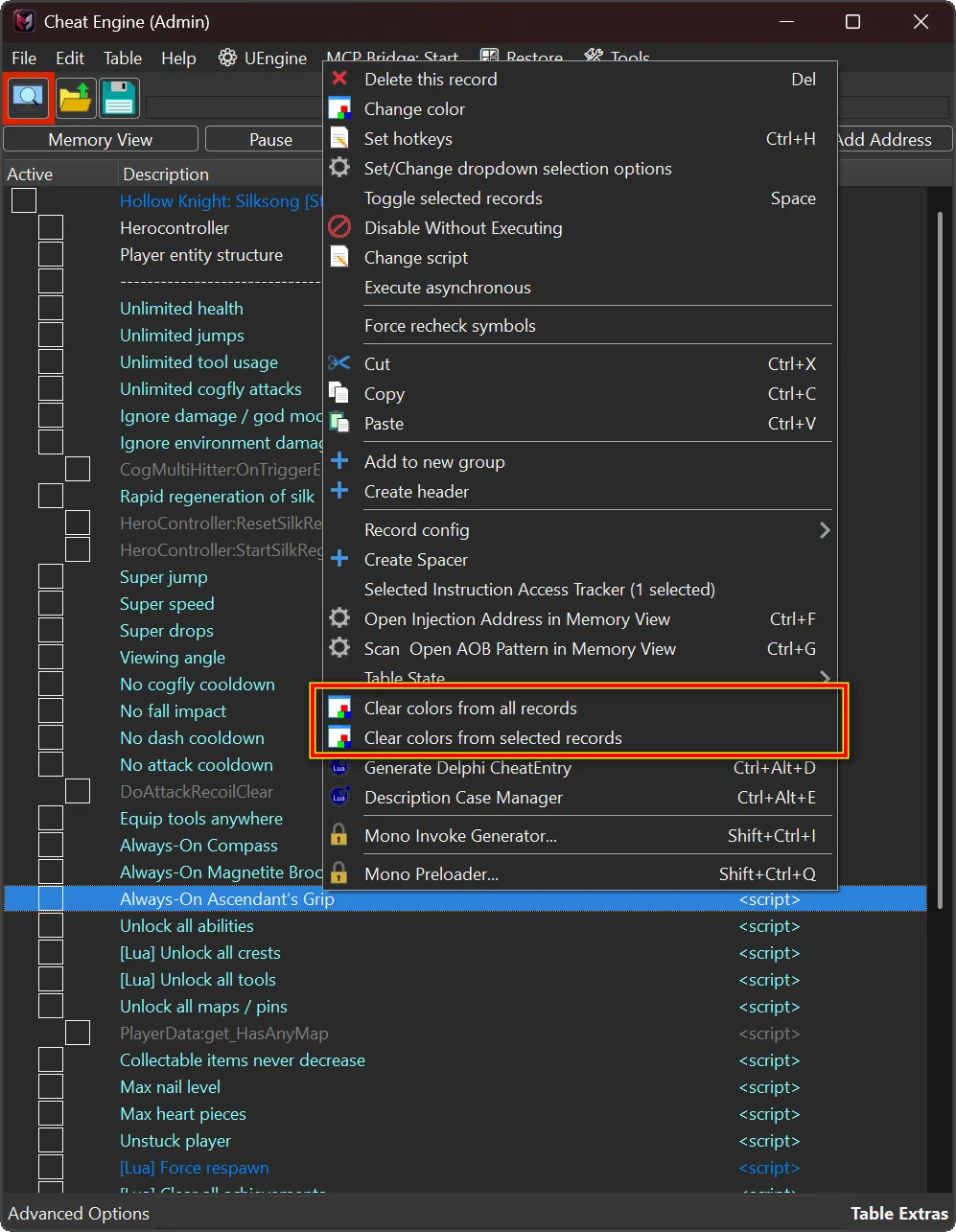
Lightweight plugin for Cheat Engine that restores the default Address List text color for selected records, their descendants, or the entire current Cheat Table.
When Cheat Tables are edited, imported, or reused, custom record colors can quickly make the Address List look inconsistent. Cleaning them manually is slow and inconvenient — especially in large tables with grouped entries.
This plugin provides a fast and safe way to reset record text colors directly from the Address List right-click menu, without affecting any other Cheat Table data.
 Plugin Information
- Name: Clear Table Colors
- Version: 1.0
- Author: mul0
- Website: https://mul0.com/cheat-engine/plugins/c ... le-colors/
- Platform: Cheat Engine Lua autorun plugin for Windows
 What the Plugin Does
- Clear Table Colors restores the default Address List text color for targeted Cheat Table records.
- It is ideal for cleaning up tables after testing, reorganizing entries, importing records, or reusing an older table.
- The plugin changes only the text color of targeted records.
 Clear Colors from Selected Records
- Select one or multiple records in the Address List.
- Right-click and choose Clear colors from selected records.
- When a group record is selected, all of its descendant records are included automatically.
- This lets you clean an entire section of a table without touching unrelated entries.
 Clear Colors from All Records
- Right-click inside the Address List.
- Choose Clear colors from all records.
- Confirm the action to reset text colors across the entire current Cheat Table.
 Key Features
- Clears text colors from one or multiple selected records
- Automatically includes descendants of selected group records
- Clears text colors from every record in the current Cheat Table
- Confirmation dialog before changing records
- Continues processing if an individual record cannot be updated
- Refreshes the Address List after cleanup
- Displays processed and failed record counts
- Safe, focused cleanup — no unrelated Cheat Table data is modified
 Safe Cleanup
- The plugin changes only Address List text colors.
- It does not modify addresses, values, scripts, activation state, descriptions, or other record properties.
- Running the cleanup again is safe: records remain at their default text color.
- Save the Cheat Table after cleanup if you want to retain the cleaned colors.
 Installation
- Download MiMain - Clear Table Colors (v1.0).lua.
- Place the file into Cheat Engine’s autorun folder: Cheat Engine\autorun
- Start or restart Cheat Engine.
- Open a Cheat Table.
- Right-click inside the Address List and choose the desired cleanup action.
 Feedback & Support
- Have a feature idea, compatibility report, or bug report? Drop a comment below!