
Hey Guys this is my first table. Should work with BPH as of January 12th 2026. I've tested it as best I could and it seems stable.
Backpack Hero
Backpack hero table
Moderator: Table Moderator
-
LockeColeFF
- Curious

- Posts: 1
- Joined: Mon Jan 02, 2023 4:35 pm
- x 4

Re: Backpack Hero
LockeColeFF wrote: Mon Jan 12, 2026 7:38 pmHey Guys this is my first table. Should work with BPH as of January 12th 2026. I've tested it as best I could and it seems stable.
Will test this today hope it still works
Re: Backpack Hero
LockeColeFF wrote: Mon Jan 12, 2026 7:38 pmHey Guys this is my first table. Should work with BPH as of January 12th 2026. I've tested it as best I could and it seems stable.
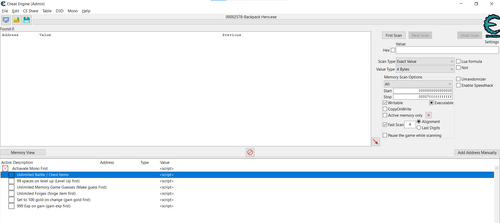
Sadly Can't Activate any of the option after activating Mono:
-
Alex Darkside
- Apprentice Hacker

- Posts: 53
- Joined: Sun Aug 21, 2022 12:08 pm
- x 31
Re: Backpack Hero
diealot wrote: Mon Oct 12, 2026 5:20 amSadly Can't Activate any of the option after activating Mono
(Google translation)
The script that is activated at the top line in your screenshot is empty, it does not activate the "mono" functions. It's just a text reminder, a dummy.
You will need to enable "mono" manually. Do you see the "Mono" menu item in your screenshot (next to "Help")? Click on it. In the drop-down list in the first line you will see an activation item. Click on it. Activation may take a few seconds (depending on the game and your program). If activation is successful, a checkmark will appear next to it.
P.S. I would recommend using this table with caution and making backup game saves before using it.
Re: Backpack Hero
Alex Darkside wrote: Mon Oct 12, 2026 1:29 pmdiealot wrote: Mon Oct 12, 2026 5:20 amSadly Can't Activate any of the option after activating Mono
(Google translation)
The script that is activated at the top line in your screenshot is empty, it does not activate the "mono" functions. It's just a text reminder, a dummy.
You will need to enable "mono" manually. Do you see the "Mono" menu item in your screenshot (next to "Help")? Click on it. In the drop-down list in the first line you will see an activation item. Click on it. Activation may take a few seconds (depending on the game and your program). If activation is successful, a checkmark will appear next to it.P.S. I would recommend using this table with caution and making backup game saves before using it.
Thanks for letting me know Alex. I don't know why the table maker just left a dummy script like this.