


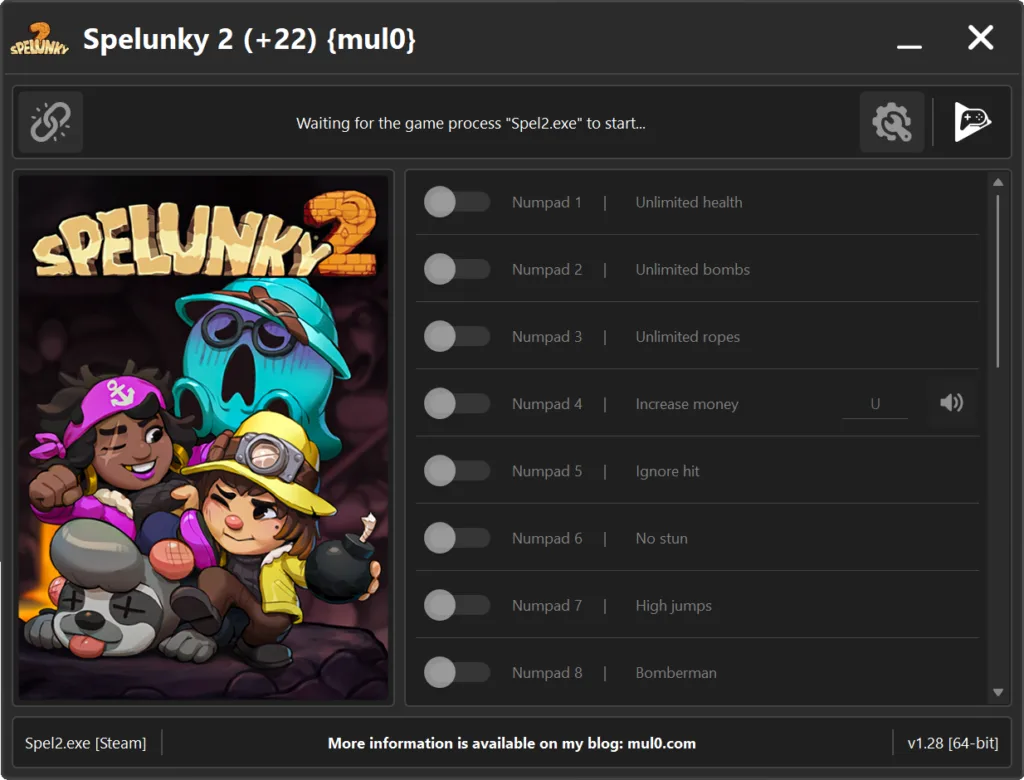
22 Options | Game Version: v1.28 | Last Updated: 15/01/2026
Game: Spelunky 2
Version: v1.28
Process: Spel2.exe (64-bit)
License Type: Steam
Date of Creation: 06.01.2026
Hotkey - Feature [Description]
Numpad 1 - Unlimited health [Prevents your health from decreasing.]
Numpad 2 - Unlimited bombs [Bombs are not consumed when used. You can throw bombs without limits.]
Numpad 3 - Unlimited ropes [Ropes are not consumed when used. You can use ropes infinitely.]
Numpad 4 - Increase money [Adds +2500 money each time you press the "U" hotkey.]
Numpad 5 - Ignore hit [Ignores incoming hits. Your character does not react to damage.]
Numpad 6 - No stun [Disables the stun effect. Your character will never be stunned.]
Numpad 7 - High jumps [Significantly increases jump height.]
Numpad 8 - Bomberman [Removes bomb cooldowns and delays. Allows throwing bombs continuously.]
Numpad 9 - Super speed [Greatly increases character movement speed.]
F1 - Show exit indicator [Enables the in-game indicator that shows the location of the level exit door.]
F2 - Unlock all characters [Unlocks all characters in the character selection menu.]
F3 - Freeze mission timer [Stops the mission timer from counting down.]
F4 - Ghost protection [Protects your character from damage caused by ghosts.]
F5 - Remove the ghost [Removes the ghost entity from the current level.]
F6 - Money multiplier [Multiplies the amount of money you receive from any source.]
F7 - Kill myself [Kills your character after a short delay of 3–5 seconds when the "L" hotkey is pressed.]
F8 - No clip [Allows moving through walls and some objects while holding "Left Ctrl" (keyboard) or hold "L2 + R2" (gamepad).]
F9 - Teleport to exit [Instantly teleports your character to the level exit door when the "T" hotkey (keyboard) or "R3" button (gamepad) is pressed.]
F10 - Free items in store [Makes all items in the in-game store free. Purchasing items does not cost any money.]
F11 - Rapid fire [Greatly increases the weapon’s firing rate, allowing shots to be fired much faster than normal.]
F12 - Automatic firing [Hold the fire button to keep shooting automatically without repeated clicks.]
A - Super shotgun [Removes weapon recoil and maximizes the shotgun’s firing rate, allowing extremely fast and stable shooting.]
Instructions:
- Copy all files from the archive to the desktop.
- Start the game and wait until it is fully loaded into gameplay (not just the main menu).
- Only after the game has finished loading, run the trainer.
- If the game process is found successfully, the connect button will become available in the trainer.
How to activate the trainer:
- To activate the trainer, click the button with the broken chain icon. It is located in the upper-left panel of the trainer interface.
- After a successful connection, you can activate and use all available features.
- During the game, press the hotkeys shown in the trainer to enable or disable features.
- Possible false alarm of your antivirus on the trainer.
- If your antivirus blocks the trainer, temporarily disable it.
Video presentation of the trainer:

 Update 17.03.2026
 Major code optimization for improved performance and stability.
 Updated and refined AOB signatures for higher accuracy.
 Improved high-DPI positioning and scaling of all interface components.
 Improved memory scan engine for faster and more reliable results