


 Auto Assembler – Smart Add / Toggle
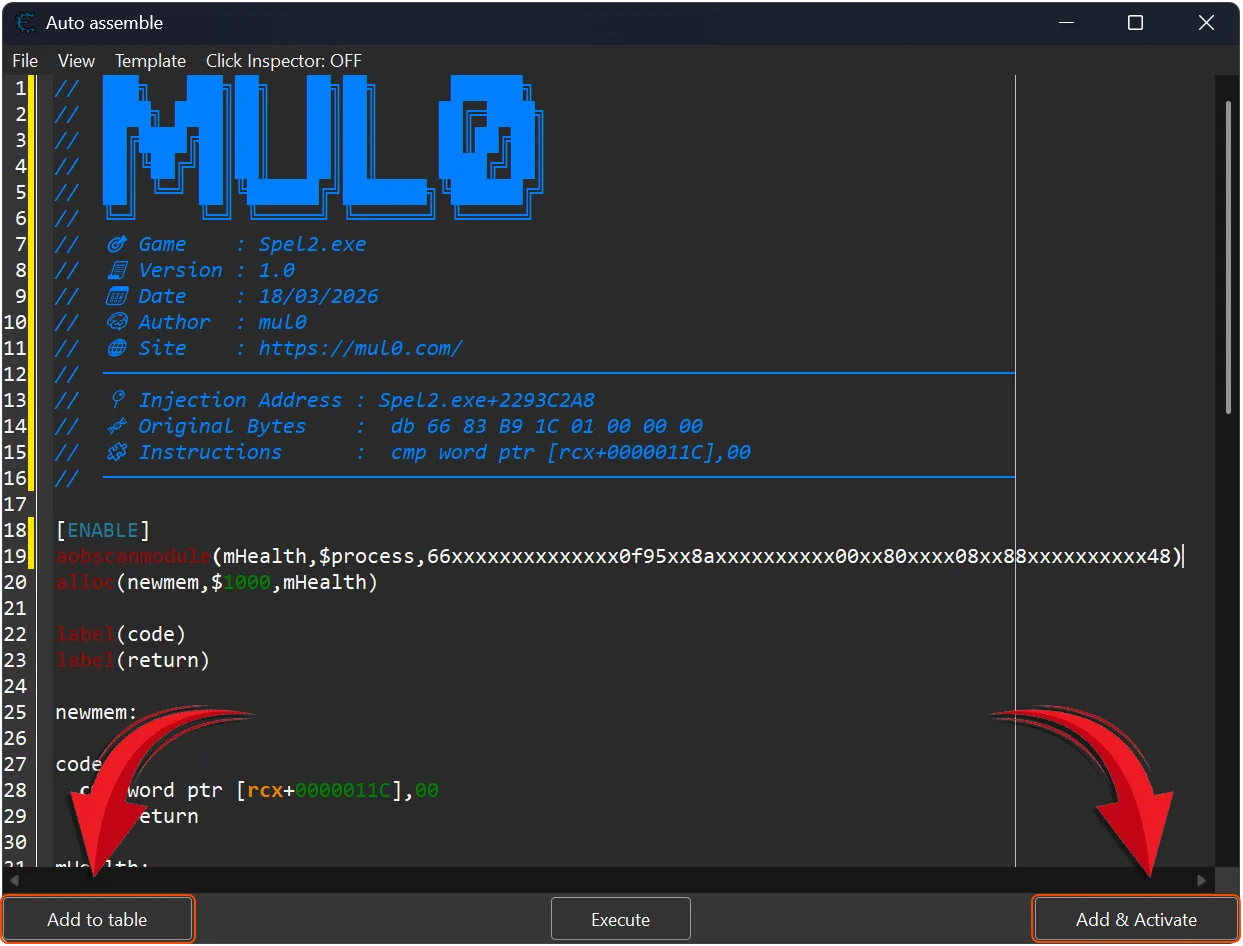
Lightweight plugin for Cheat Engine that enhances the Auto Assembler window by adding smart control buttons for scripts management.
This plugin introduces an intelligent workflow: it automatically detects whether the current script already exists in the cheat table and either adds & activates it or simply toggles its state — no duplicates, no manual searching. 
Auto Assembler Smart Toggle is a Cheat Engine Lua plugin designed to simplify script handling, reduce repetitive actions, and improve workflow efficiency during reverse engineering and cheat development.

 Plugin Information
- Version: 1.0
- Author: mul0
- Website: https://mul0.com/cheat-engine/cheat-eng ... dd-button/
- Platform: Cheat Engine (Lua plugin)
 Key Features
- Smart Add & Activate
-- Adds script to the table and instantly activates it if not already present. - Auto Toggle Existing Script
-- If the script already exists — toggles ON/OFF instead of adding duplicates. - Duplicate Prevention
-- Uses normalized script comparison to reliably detect existing entries. - Quick Add Button
-- Adds script to table without activating (manual control). - Dynamic Button Caption
-- Button text changes depending on script state: - Add & Activate
-- Activate cheat
-- Deactivate cheat
🖥 UI Integration 🖥
- Adds two buttons directly into the Auto Assembler window:
-- Add to table
-- Add & Activate / Toggle - Automatically positions buttons relative to existing controls
- Fully integrated into TfrmAutoInject form
- Prevents duplicate entries in the cheat table.
- One-click add & activate functionality.
- Safe execution using protected calls (pcall).
- Clean integration into existing Auto Assembler UI.
 How It Works (Technical Overview)
- The plugin reads current Auto Assembler script
- Scans Cheat Engine address list
- Compares scripts using normalized matching
- If match found → toggles Active state
- If not found → adds script and activates it
This ensures accurate detection and zero duplication, even if scripts differ slightly in formatting.

Installation
- Place the “MiAuto Assembler – Smart Add Button.lua“ file into Cheat Engine’s autorun (Cheat Engine\autorun) folder
- Restart Cheat Engine
- Open Auto Assembler — buttons will appear automatically.
 Feedback & Support
- Have suggestions or found a bug?
- Leave a comment on the blog — feedback is always welcome!


