



 Quick Jump Patch — Cheat Engine Plugin
Lightweight yet powerful plugin for Cheat Engine that allows you to instantly patch assembly instructions directly from the Memory Viewer with a single hotkey press.
Instead of manually editing opcodes or writing Auto Assembler scripts, this tool provides a faster and more intuitive way to control program execution. As a result, it significantly improves efficiency during reverse engineering, debugging, and game hacking workflows.
Moreover, the plugin focuses on jump instructions and execution flow control. Therefore, you can easily toggle NOP, invert conditional jumps, or force JMP instructions without leaving the disassembler. In addition, this reduces manual effort and speeds up analysis.
Furthermore, all patches are fully reversible and safely tracked. Because of this, you can restore original instructions at any time. Consequently, you maintain full control over memory modifications while avoiding unwanted errors.
At the same time, the plugin automatically handles instruction size and byte replacement. For this reason, patches remain stable and reliable in most scenarios.
Finally, the built-in Patch Manager provides a clear overview of all active patches. In other words, you can quickly navigate, inspect, and restore instructions whenever needed.
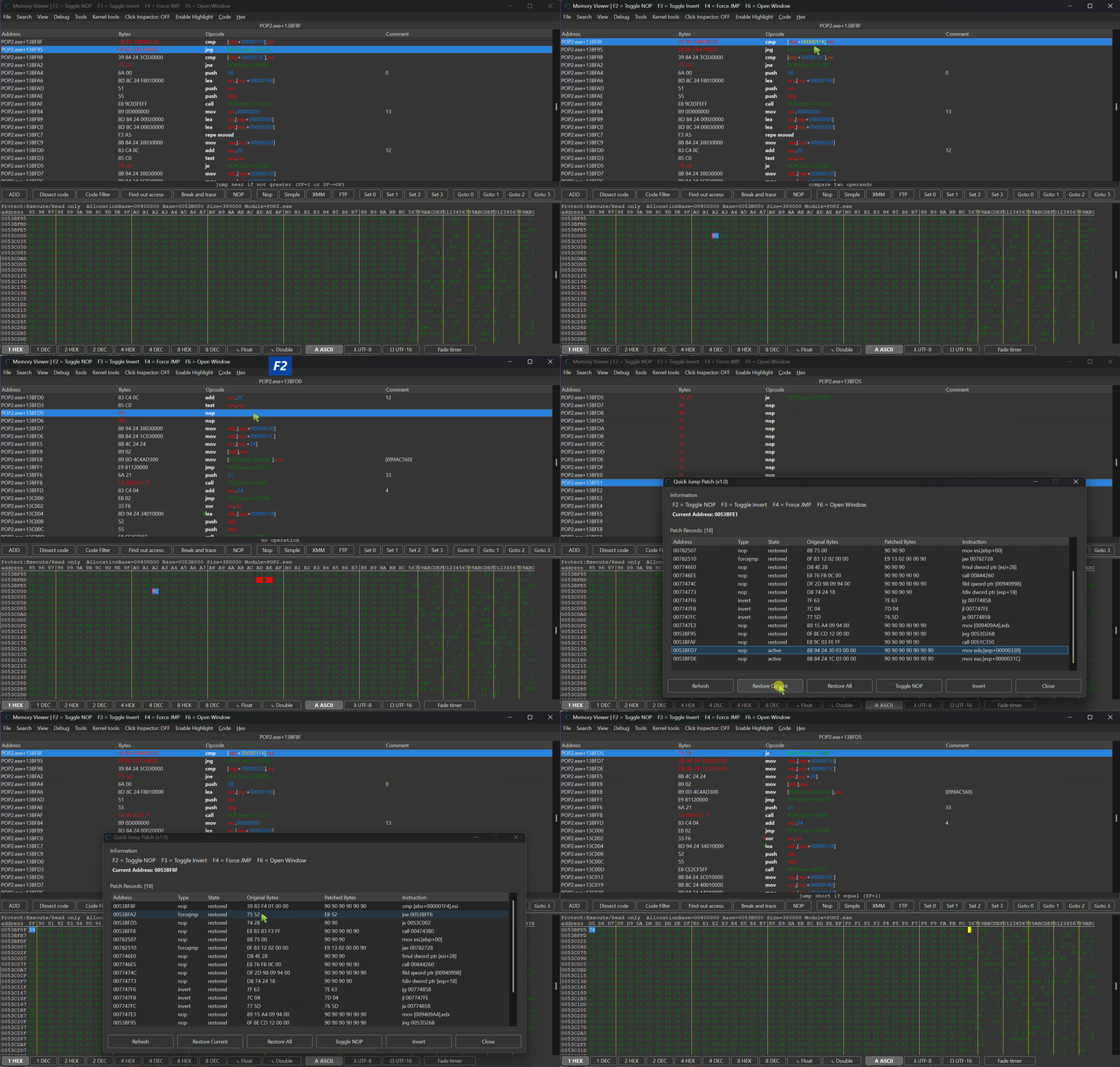

 Plugin Information
- Version: 1.1
- Author: mul0
- Website: https://mul0.com/cheat-engine/cheat-eng ... ump-patch/
- Hotkey: F7
- DPI Support: 100% / 125% / 150% / 175%
 Key Features
 One-click patching directly in Memory Viewer
- Toggle NOP on any instruction
- Invert conditional jumps (JE ↔ JNE, JG ↔ JLE, etc.)
- Force execution flow with unconditional JMP
- Toggle RET on any instruction
- Instant restore of original instructions
- Patch Manager with full patch list and navigation
- Automatic instruction analysis and size handling
- Safe patch tracking with original byte backup
- Works seamlessly with disassembler and hex view
- Lightweight and performance-friendly
 One-click patching directly in Memory Viewer
 What the Plugin Does
Quick Jump Patch allows you to modify execution flow in real time by patching instructions directly in memory.
For example, instead of manually changing:
- jng 0053D268
You can instantly convert it into:
- jg 0053D268
Or even force execution with:
- jmp 0053D268
All operations are performed instantly using hotkeys, without interrupting your workflow.
 Supported Modes
 NOP Toggle
- Replaces the current instruction with NOPs
- Press again to restore original bytes
Invert Conditional Jump
- Automatically flips jump conditions (JE ↔ JNE, JA ↔ JBE, etc.)
- Perfect for bypassing checks and conditions
- Press again to restore original bytes
Force JMP
- Converts any conditional jump into unconditional JMP
- Forces execution to always follow the jump path
- Press again to restore original bytes
RET Toggle
- Replaces the current instruction with RET
- Press again to restore original bytes
 Patch Manager
Built-in manager window allows you to:
- View all patched instructions
- See patch type and status
- Navigate to patched addresses
- Restore selected patches
- This ensures full visibility and control over all applied modifications.
 Usage
Usage
- Open Memory Viewer
- Select an instruction in Disassembler
- Use hotkeys:
-- F2 — NOP toggle
-- F3 — Invert jump
-- F4 — Force JMP
-- F6 — Toggle RET - Press F7 to open Patch Manager
 UI & DPI Scaling
The plugin automatically adapts to different DPI settings:
- 100%
- 125%
- 150%
- 175%
Ensuring consistent layout and usability across all displays.
 Use Cases
- Bypassing in-game checks
- Forcing conditions to always pass/fail
- Skipping validation logic
- Testing alternative execution paths
- Reverse engineering control flow
Compatibility
- Cheat Engine 6.4 or newer
- Supports x86 and x64 processes
- Works inside Memory Viewer
Installation
- Place the “MiMemory Viewer – Quick Jump Patch.lua” file into Cheat Engine’s autorun (Cheat Engine\autorun) folder
- Restart Cheat Engine.
- Open Memory Viewer and use hotkeys to start patching
 Feedback & Support
- Have suggestions or need help? Drop a comment below!


 Added F6 key for toggling RET patch and updated UI captions to reflect the new hotkey.