[Lua] Cheat Engine – Plugin | Register Highlight
 Register Highlight v1.1 — Plugin for Cheat Engine
Register Highlight is a lightweight Lua plugin for Cheat Engine that highlights user-defined text directly in the Memory Viewer → Disassembler view.
When debugging or reverse engineering, tracking registers across a large block of assembly instructions can become difficult. Important values such as RAX, RCX, or XMM0 can easily get lost in the instruction flow.
Version 1.1 expands the original register-highlighting feature into a more flexible disassembly analysis tool. In addition to registers, the plugin can now highlight register-offset expressions, bracketed memory operands, opcodes, and opcode prefixes.
This makes it easier to follow important values and instructions while scrolling through disassembled code.
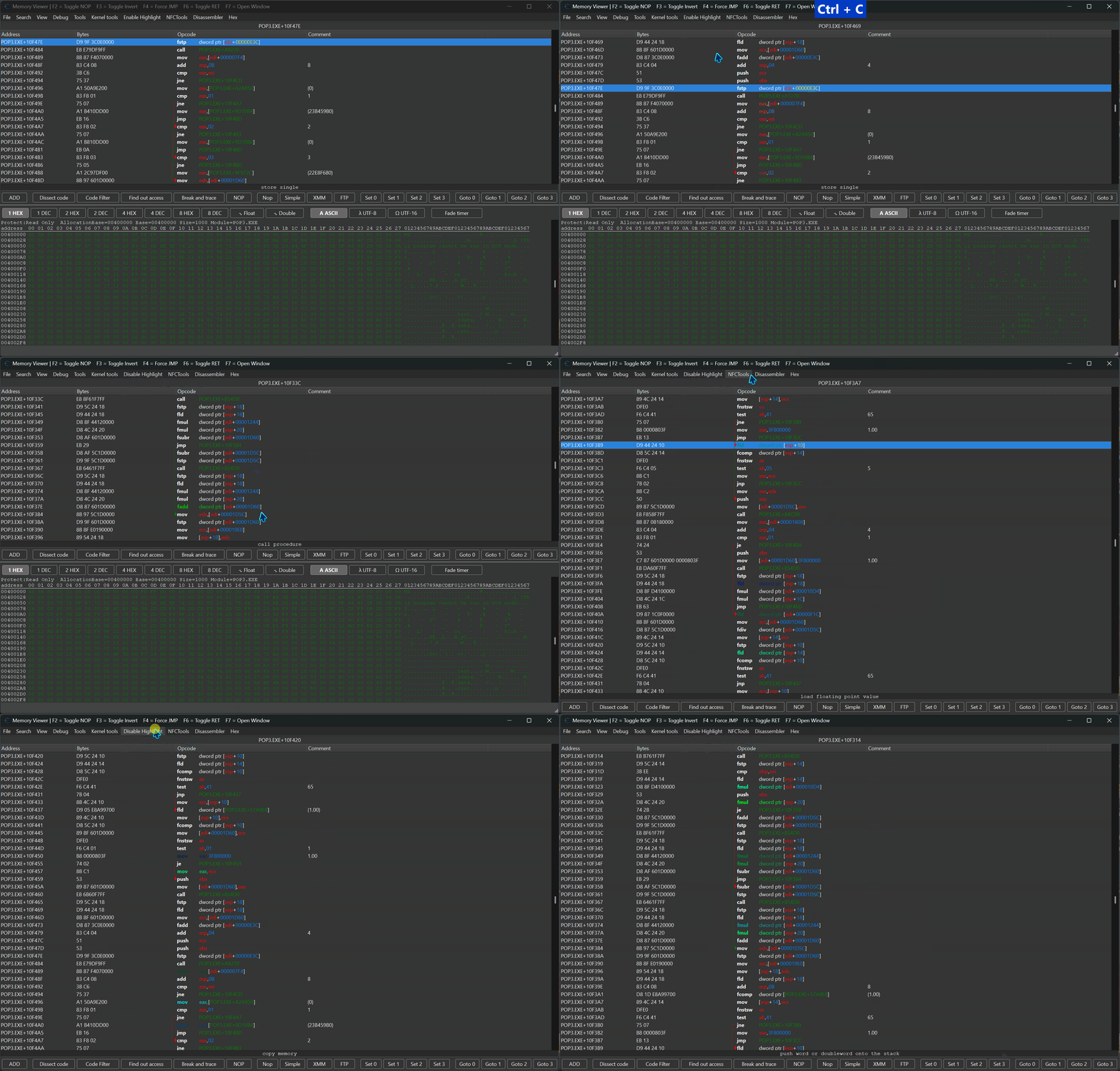

 Plugin Information
- Version: 1.1
- Author: FreeER (original) + refactor and optimizations by mul0
- Website: https://mul0.com/cheat-engine/cheat-eng ... highlight/
- Platform: Cheat Engine Lua plugin
- Compatibility: Cheat Engine 6.4 or newer
 What's New in v1.1
 Optimized Highlighting — Refactored and improved the original register-highlighting behavior.
 Register-Offset Expressions — Added support for expressions such as ecx+08 and [ecx+08].
 Whitespace-Insensitive Matching — ecx+08 also matches ecx + 08.
 Offset Normalization — Recognizes equivalent offsets written as 8, 08, 0x08, or 08h.
 Opcode Highlighting — Added support for opcodes such as fld, fstp, and mov.
 Opcode-Prefix Highlighting — Added support for prefixes such as fld dword ptr.
 Syntax Color Preservation — Preserves Cheat Engine syntax colors outside highlighted text.
 Optional Debug Diagnostics — Added troubleshooting output that is disabled by default.
 Optimized Highlighting — Refactored and improved the original register-highlighting behavior.
 Register-Offset Expressions — Added support for expressions such as ecx+08 and [ecx+08].
 Whitespace-Insensitive Matching — ecx+08 also matches ecx + 08.
 Offset Normalization — Recognizes equivalent offsets written as 8, 08, 0x08, or 08h.
 Opcode Highlighting — Added support for opcodes such as fld, fstp, and mov.
 Syntax Color Preservation — Preserves Cheat Engine syntax colors outside highlighted text.
 Optional Debug Diagnostics — Added troubleshooting output that is disabled by default.
 Plugin Features
 Register Highlighting — Highlights registers such as eax, rax, rcx, xmm0, and r8.
- Expression Highlighting — Highlights memory expressions such as ecx+08 and [ecx+08].
- Opcode Highlighting — Highlights instructions such as fld, fstp, and mov.
- Instruction-Prefix Highlighting — Highlights prefixes such as fld dword ptr.
- x86 and x64 Support — Works with both 32-bit and 64-bit processes.
- Multiple Memory Viewer Windows — Applies highlights per DisassemblerView.
- Safe Hooking — Preserves and restores existing OnPostDisassemble handlers.
- Cheat Engine Syntax Colors — Keeps unrelated disassembly formatting readable.
 Register Highlighting — Highlights registers such as eax, rax, rcx, xmm0, and r8.
 How It Works
Open the Cheat Engine Memory Viewer.
Select Highlight from the menu.
Enter the register, expression, opcode, or instruction prefix you want to track.
The plugin applies a visible color highlight to matching disassembly text while preserving existing Cheat Engine syntax colors outside the matched area.
Select Highlight again to disable the active highlight.
🖥 Example Use Cases
Track a register:
raxTrack a memory expression:
[ecx+08]Match expressions with different formatting:
ecx+08
ecx + 08
ecx+0x08
ecx+08hTrack an opcode:
fldTrack an instruction prefix:
fld dword ptr
 Compatibility
- Cheat Engine 6.4 or newer
- Supports x86 and x64 processes
- Works with multiple Memory Viewer instances
- Preserves existing Cheat Engine disassembler syntax highlighting
- Compatible with other plugins that use OnPostDisassemble handlers
 Installation
- Download "MiMemory Viewer - Highlight (v1.1).lua".
- Place the file inside the Cheat Engine autorun folder:
Cheat Engine\autorun\ - Start or restart Cheat Engine.
- Open Memory Viewer.
- Select Highlight from the menu and enter the text you want to track.
 Important Notes
- Highlighting is applied per DisassemblerView.
- Register-offset matching supports bracketed and non-bracketed expressions.
- Equivalent offset formats such as 8, 08, 0x08, and 08h are recognized.
- Existing Cheat Engine syntax colors outside highlighted text are preserved.
- Optional debug diagnostics are disabled by default.
 Feedback & Support
- Have suggestions, bug reports, or ideas for improvement? Leave a comment on the blog — feedback is always welcome!

