


 Steam Achievement Manager v1.0 — Achievement Utility
Steam Achievement Manager v1.0 by mul0 is a Win64 desktop utility for browsing your owned Steam games, viewing their achievement catalogs, and managing selected achievement states from one responsive interface.
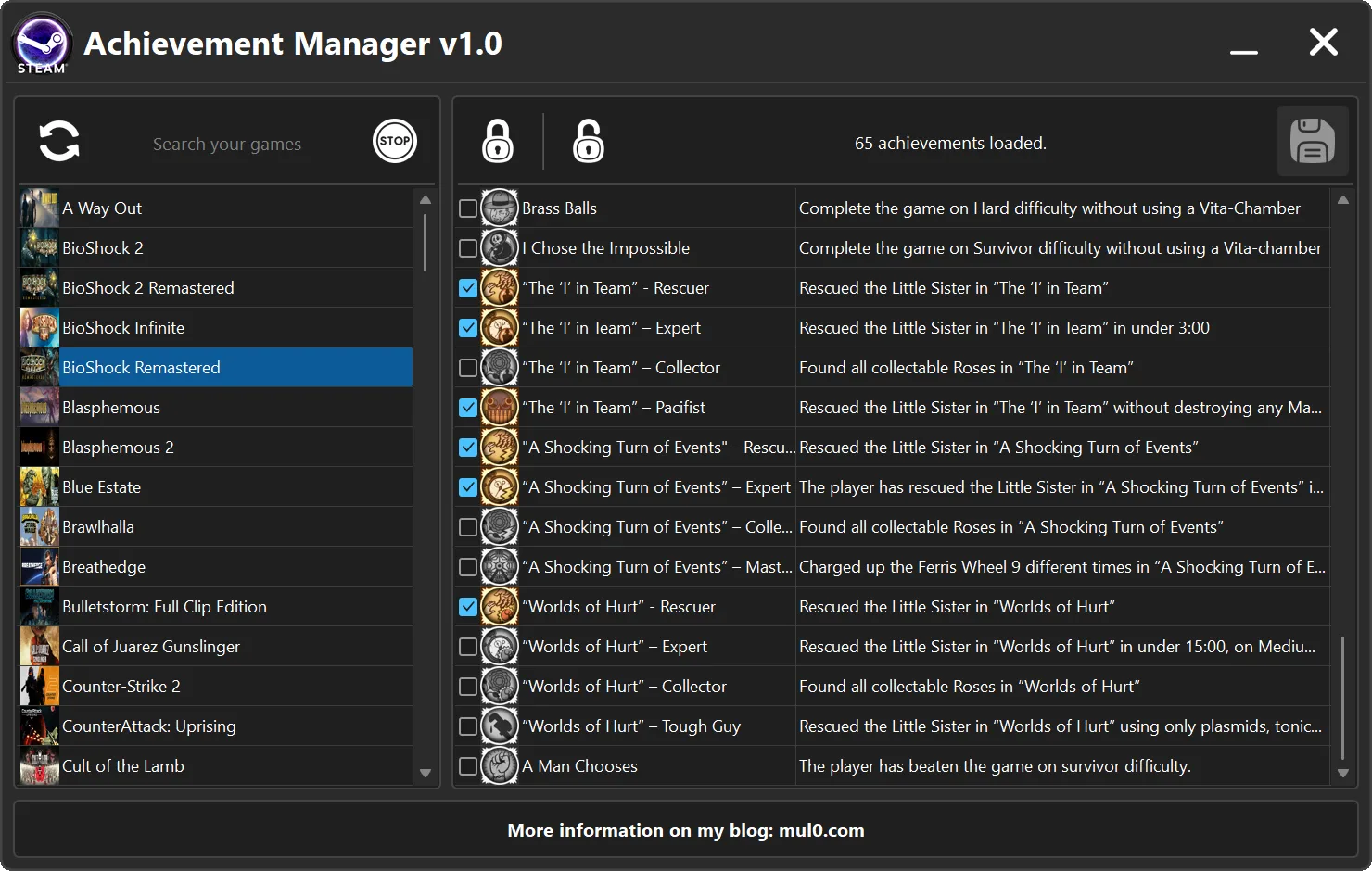
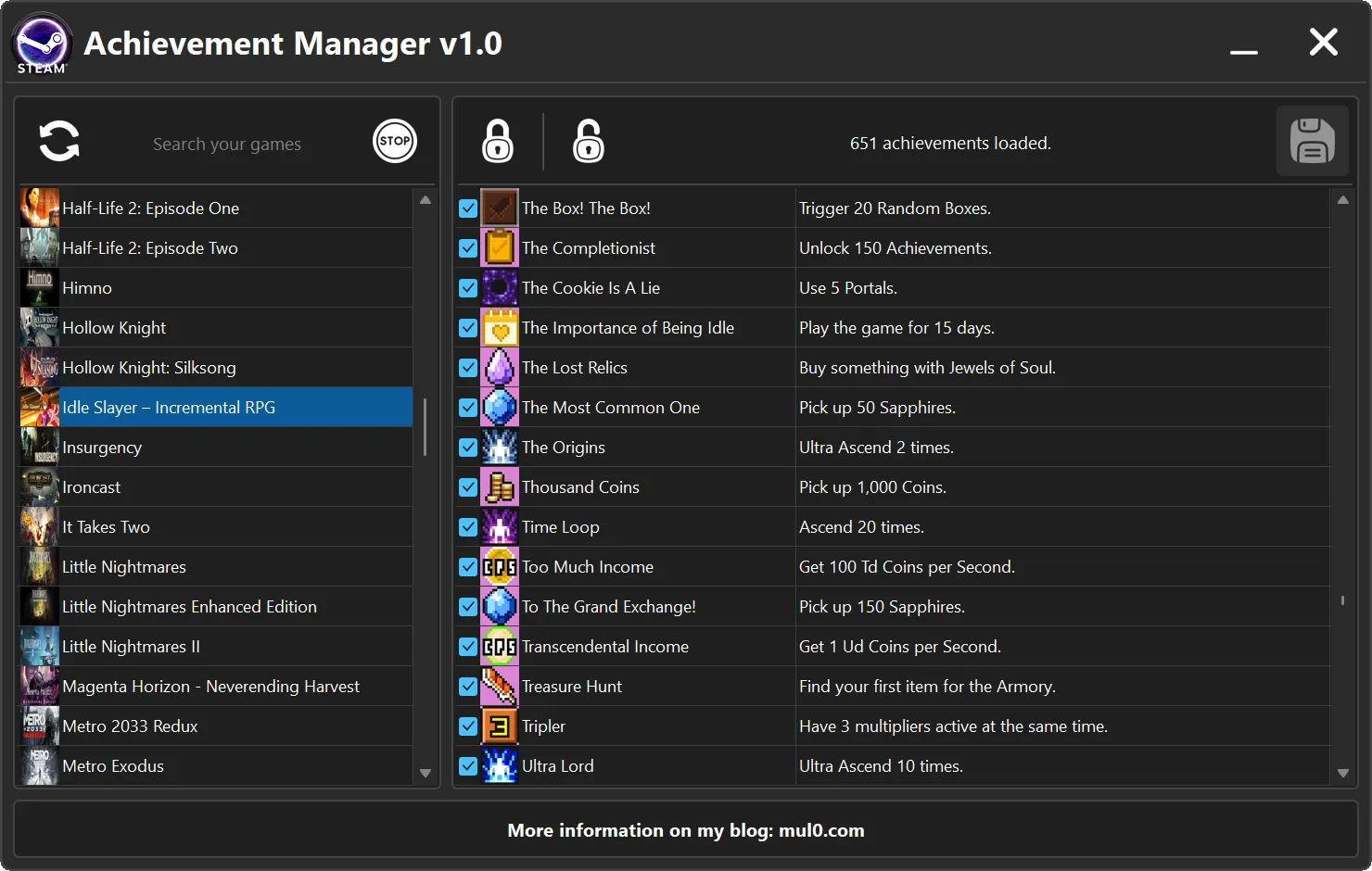
The program loads your Steam library into a searchable game list with cover images. Double-click a game to view its achievement names, descriptions, icons, and current unlocked or locked states.
You can change individual achievement checkboxes, select every achievement for unlocking, clear every selection for locking, and submit only the states that differ from the values loaded from Steam.
An optional background-hosting feature can keep selected Steam App IDs active without launching the real games.
 Program Information
- Name: Steam Achievement Manager
- Version: 1.0
- Author: mul0
- Website: Official program page
- Architecture: 64-bit
- Platform: Steam for Windows
- Release Date: 24/August/2026
 What the Program Does
- Loads the current user's owned Steam game library.
- Displays games in a searchable list with cached cover images.
- Loads the achievement catalog for a selected game.
- Shows achievement names, descriptions, icons, and current Steam states.
- Allows individual or bulk checkbox selection.
- Applies only the achievement states that differ from the loaded values.
- Provides optional per-game background hosting without launching the real game.
 Browse Your Steam Library
- Start Steam and sign in to the account you want to use.
- Open Steam Achievement Manager v1.0.
- Click the refresh button to load or update your owned game library.
- Use the search field to filter games by name.
- Select a game to make the background-host control available.
- Double-click a game to load its achievements.
Game covers are cached locally so they can be reused during later sessions. While library information and images are loading, the interface keeps the related controls safely disabled until the current operation finishes.
View and Select Achievement States
- Each achievement row displays its icon, name, description, and current Steam state.
- Check or uncheck an individual row to prepare a specific achievement change.
- Use the Unlock control to check every achievement row.
- Use the Lock control to clear every achievement row.
- Review all intended changes before submitting them.
Important: The Unlock and Lock controls change the visible checkbox selections only. They do not immediately update your Steam account.
 Submit Achievement Changes
- The Submit control becomes available only when at least one checkbox differs from the state loaded from Steam.
- Clicking Submit sends only the changed achievement states.
- Checked changed rows are submitted for unlocking.
- Unchecked changed rows are submitted for locking.
- After the operation completes, the visible achievement list is refreshed with the resulting states.
Achievement submissions affect the Steam account that is currently signed in. Always confirm the selected game and every changed checkbox before clicking Submit.
 Background Game Hosting
- Select a game and use GAME START to start its background Steam host.
- The selected Steam App ID remains active without launching the real game.
- Use GAME STOP to stop that game's host.
- Multiple standalone game hosts can run at the same time.
- If achievements are opened for a game that is already hosted, the manager reuses the existing host instead of starting a duplicate process.
- All active host processes are closed automatically when Steam Achievement Manager exits.
 Key Features
- Searchable owned-game library
- Cached Steam game cover images
- Achievement names, descriptions, icons, and current states
- Individual achievement checkbox control
- Select-all unlocking and clear-all locking selections
- Changed-state-only submission
- Optional background Steam App ID hosting
- Multiple simultaneous standalone game hosts
- Automatic host cleanup when the manager closes
- Responsive, DPI-aware Win64 interface
 Installation and Usage
- Download the Steam Achievement Manager archive.
- Extract every file into the same folder.
- Keep Steam Achievement Manager v1.0.exe, SteamCoreAPI.dll, and GameHostRuntime.exe together.
- Start Steam and sign in.
- Run Steam Achievement Manager v1.0.exe.
- Click Refresh to load the Steam game list.
- Search for a game and double-click it to load its achievements.
- Prepare the intended checkbox changes and click Submit.
 Included Files
- Steam Achievement Manager v1.0.exe — main Win64 application and user interface
- SteamCoreAPI.dll — native Steam library and achievement bridge
- GameHostRuntime.exe — background per-game Steam host used by the manager
 Important Notes
- Steam must be installed, running, and signed in before the game library can be loaded.
- Achievement changes affect the currently signed-in Steam account.
- Some games may not expose a usable achievement catalog.
- Steam or game updates can affect compatibility.
- Keep all three runtime files in the same folder.
- Use the program responsibly and respect applicable game rules, Steam terms, and third-party rights.
 Feedback & Support
- Have a compatibility report, feature idea, or bug report? Drop a comment below!

- More trainers, Cheat Engine plugins, and PC gaming tools are available at mul0.com.

VirusTotal
VirusTotal (Steam Achievement Manager v1.0.exe):
https://www.virustotal.com/gui/file/6f3 ... dabb41313c
VirusTotal (GameHostRuntime.exe):
https://www.virustotal.com/gui/file/53f ... a7f746b524
VirusTotal (SteamCoreAPI.dll):
https://www.virustotal.com/gui/file/33b ... ee8850f30c